
I’ll share my honest Astra theme review.
In 2020, I was looking for a fast and lightweight WordPress theme for my blog.
I tried many themes like GeneratePress, OceanWP, and Neve.
I was installing them one by one and testing the speed.
Finally, I came across Astra WordPress theme. And decided to give it a try.
Guess what?
I was amazed.
The performance of Astra is beyond impressive. Now, whenever I launch a new website, I try Astra theme first.
Today, I’m going to share my personal experience using Astra.
Let’s dive in.
What Is the Astra Theme?
Astra is one of the most popular WordPress themes with over 1,653,898 users. Brainstorm Force is the company behind Astra.
The Astra team says, “Astra is a result of hundreds of hours spent finding the pain points with current solutions, and then researching what users really want.”
Initially, it was a web design agency. They used to build websites for other businesses. They couldn’t find any reliable theme on the market.
At that time, most themes didn’t allow much customization. And the themes were too slow. Astra theme was born out of frustration.
Who Astra Is For?
Astra theme is a versatile WordPress theme. You can use it for almost all kind of websites.
Astra theme is a good fit for:
- Bloggers
- Freelance website designers building websites for clients
- Ecommerce websites using WooCommerce
- Business owners like restaurants, hotels, bakeries, etc.
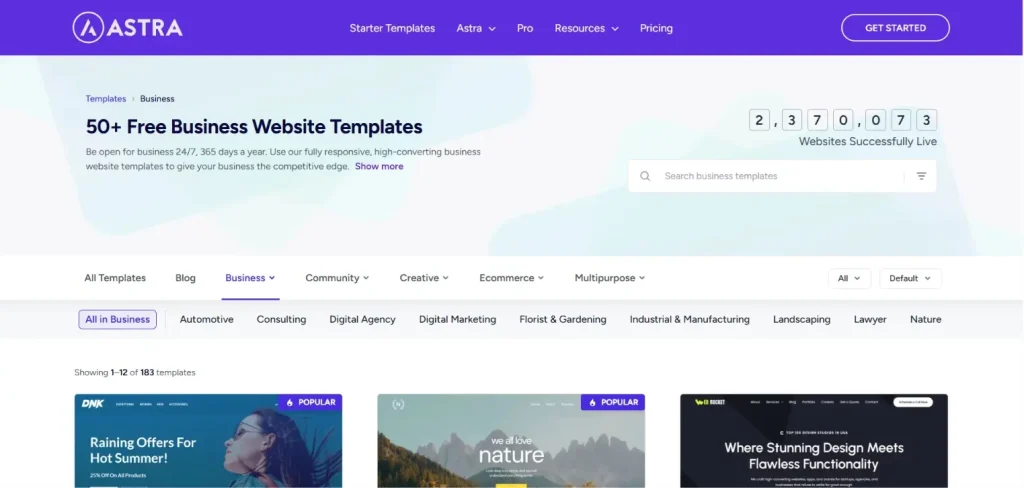
You can check out all the Astra website templates.
You can use Astra with Elementor for drag, drop, and design without touching a line of code.
Astra WordPress Theme Features
Here are the benefits of Astra Pro:
- Site Builder
- Custom Header and Footer
- Page Background Styling
- Sticky When Scroll Up
- Full Width Site Layout
- 24/7 Support
- Add Custom Code
- Slide Search
- White Label
- Breadcrumbs Shortcode
- WooCommerce Mini-Cart Shortcode
- WooCommerce Header – Customized Cart Menu
- Add To Cart Button Styling
If you want to start a blog, you can check out this step-by-step guide to start a WordPress blog.
How To Install The Astra Theme In WordPress?
Installing the Astra theme is pretty simple.
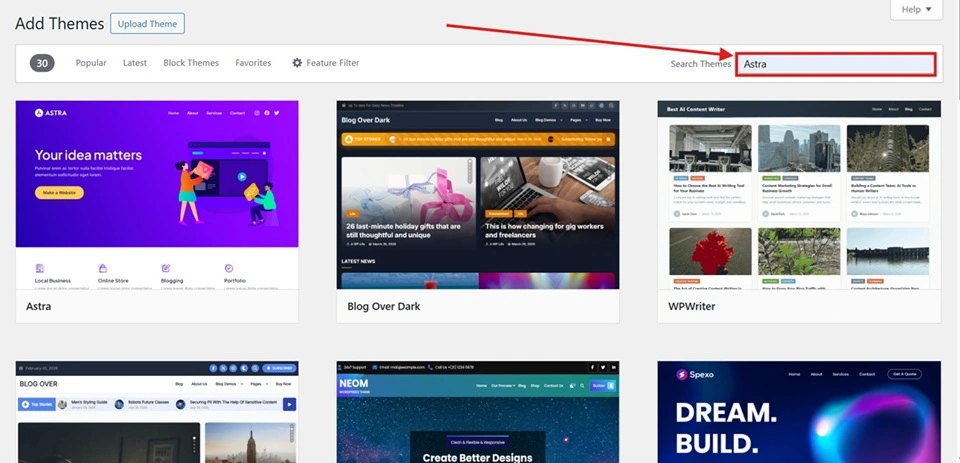
First, you need to log in to your WordPress account.
Now, click on Appearance.
Next, Click on Add Theme.
Search for Astra.
Finally, click on Install.
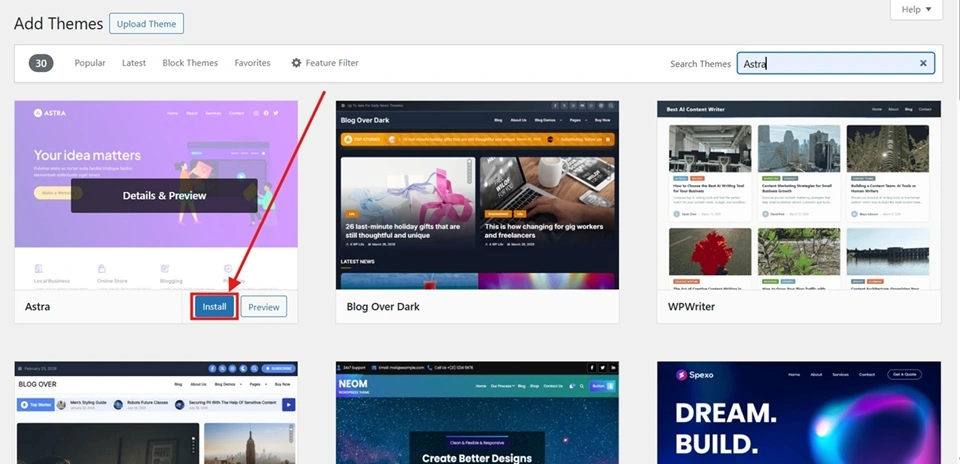
Now, Astra theme is installed on your WordPress website.
Read Also: WordPress SEO Guide
Astra Theme Pros and Cons
Here are the pros and cons.
Pros
- Great overall performance
- Fast loading
- User-friendly
- Easy to customize
- Affordable
- Great customer support (Knowledgeable and helpful)
- Responsive
Cons
- Limited features on the free version
- Relies on the page builder for complex layouts
- Priority support is only for Pro users
Astra Free vs Pro
Astra free version is enough for beginners. But if you want to unlock the full features, just go for the Astra Pro version.
The Pro version totally worth it.
Is Astra Good for WordPress?
Yes, Astra is one of the best WordPress themes out there. It allows you to customize your website and give it a professional look.
And the best part?
You don’t need to do any coding.
You can use it with page builders like Elementor.
Give Astra a shot. And you’ll not regret it.
How Much Does Astra Theme Cost?
Astra theme has a free plan. If you want to access all the premium features and templates, you need to buy a premium plan.
The Astra theme has 3 plans.
Here’s the pricing comparison:
- Astra Pro – $69/Year
- Essential Toolkit – $119/Year
- Business Toolkit – $159/Year
Can I Use Astra Without Elementor?
Elementor is a page builder. You can use Astra without a page builder like Elementor. When I started building websites with WordPress, I used it without Elementor.
If you want a simple website design, you don’t need a page editor.
How Fast Is The Astra WordPress Theme?
WordPress is one of the fastest WordPress themes. When I first used Astra, I chose it because of the faster load time.
What Is The Best Alternative To The Astra Theme?
Over the years, I’ve used too many WordPress themes across multiple sites. I must say Astra is one of the best and fastest WordPress themes.
But there are some other Astra themes as well:
- Sydney
- Kadence WP
- GeneratePress
- OceanWP
FAQs
If you’re just getting started, you don’t need to buy the Astra Pro subscription. The free version can work for you.
Yes, you can use Astra for free. If you want to use all the features, you need to upgrade to a premium plan.
Yes. The Astra theme is SEO-friendly. As long as you’re focusing on on-page SEO best practices, you’re good to go.
Astra is fully compatible with Elementor. You can use Astra and Elementor together.
Astra theme is a responsive WordPress theme. Responsive themes ensure your website looks and functions perfectly, whether viewed on a mobile phone, tablet, or desktop.
Astra is a theme. And Elementor is a page builder. You can’t compare them. If you want more customization, you can use Elementor page builder with Astra theme.
Conclusion
I’ve used Astra for a long time. And it’s one of the best WordPress themes for sure. If you’re looking for a free, fast, and lightweight theme, go for Astra.
