There are many SEO guides exists on the web. They are good. By following their SEO tips, you can get results. But if you’re just getting started, those guides can overwhelm you.
When I started doing SEO in 2019, I used to read a lot of SEO guides and get more confused. And it was not my fault.
Yes, I followed the SEO guides step by step.
Guess what?
I was getting little to no results. My organic traffic was less than 100/month.
I decided to experiment with SEO.
After a lot of trial and error, I saw some results. My organic traffic went up to over 500 visitors per day. It took around 6 months.
I realized something very useful. Those guides were not wrong. But those SEO guides were not beginner-friendly.
As a beginner, when you see too much information and steps, you tend to be confused and overwhelmed.
I wish I knew how to do SEO for a website step by step.
Many people are still struggling to get traffic from Google. So I thought I would create a step-by-step SEO guide.
Below, I’m going to share the exact steps to get organic traffic, leads, and sales through SEO.
Let’s dive in.
What Is SEO and Why Is It Important?
SEO is the practice of optimizing a website for ranking higher on search engines like Google. It includes creating content, optimizing on-page SEO, fixing technical SEO, and doing off-page SEO.
Many business owners ask: “Why should I invest in SEO”?
Good question.
And I have a good answer as well. You should invest in SEO because your target customers are using search engines to search.
According to HubSpot State of Marketing Report 2026, SEO is the most leveraged marketing channel.
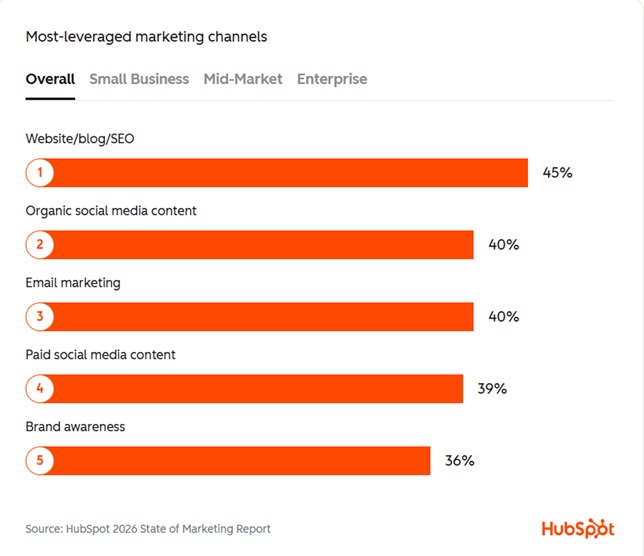
If you ignore SEO, you can’t reach your potential customers who are searching for your product/service on search engines.
If you follow the SEO best practices, you’ll see:
- Increased organic search visibility and traffic
- More qualified leads and sales
- Build solid credibility
- Compounding ROI over time
- Better user experience
Now you know why you should invest in SEO. It’s time to create your first SEO strategy for your website.
Read Also:
Step #1: Set Your SEO Goals
You need to set your SEO goals.
Setting goals can help you create an effective SEO content strategy.
First, you need to set your business goals.
What you’re trying to achieve with your business.
Align your business goals with SEO goals.
While someone might prioritize brand awareness, another may focus on increasing traffic or capturing leads.
You must first define what winning looks like.
Here are some examples of SEO goals:
- Increase Organic Revenue: Grow total revenue from organic search traffic by 20% year-over-year.
- Improve Lead Generation: Increase the number of organic monthly leads (form fills, demo requests) from 500 to 750.
Step #2: Identify Your Target Keywords
Keyword research is the process of finding queries people use when they’re searching for a solution on search engines like Google. You need to find relevant keywords for your website.
You can use Semrush or Ahrefs to find keywords.
Don’t just jump into a keyword research tool. Before finding your keywords, you need to understand search intent, the business value of keywords, search volume, and keyword difficulty.
Search Intent
Search intent is the reason behind a search. In simple terms, it’s the specific goal someone has in mind when they type a query into Google.
Primarily, there are four types of search intent:
- Informational
- Navigational
- Commercial
- Transactional
Recently, I wrote a comprehensive guide on search intent.
Business Value
This is the most important factor you should keep in mind. If your keyword doesn’t have any business value, you shouldn’t waste time creating content on that topic.
The only exception to this is when your goal is to monetize your website with AdSense.
If you’ve a business and want to do SEO for your website to grow, you should consider business value.
Getting traffic feels good. And getting sales through SEO feels great.
Here’s an example keyword for you: “best email marketing software for small business.”
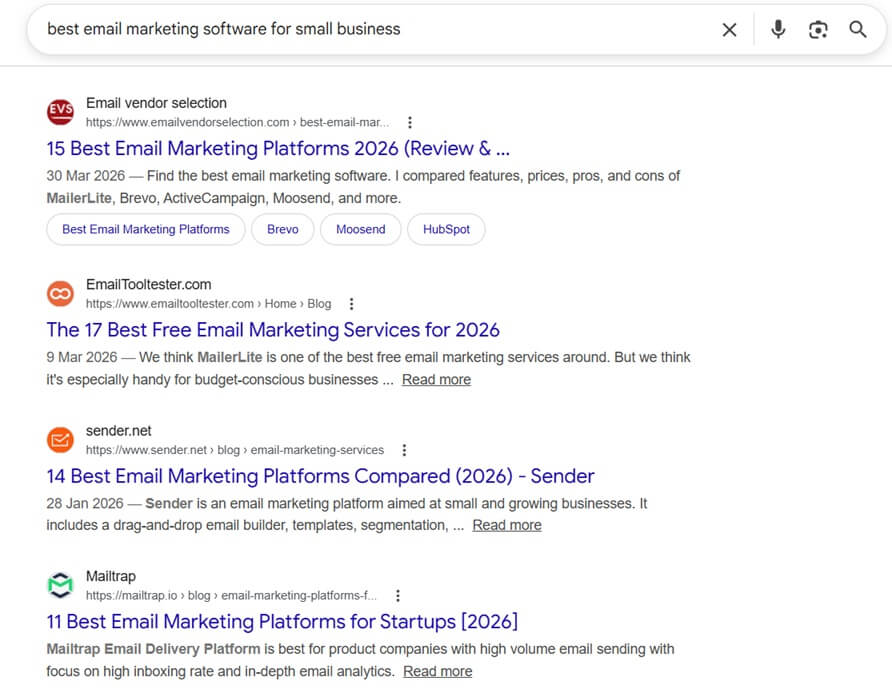
In this case, the user is looking for the best email marketing software. They’re in a buying mode. They want to swipe their credit card.
Now take this keyword: “What is email marketing software?”
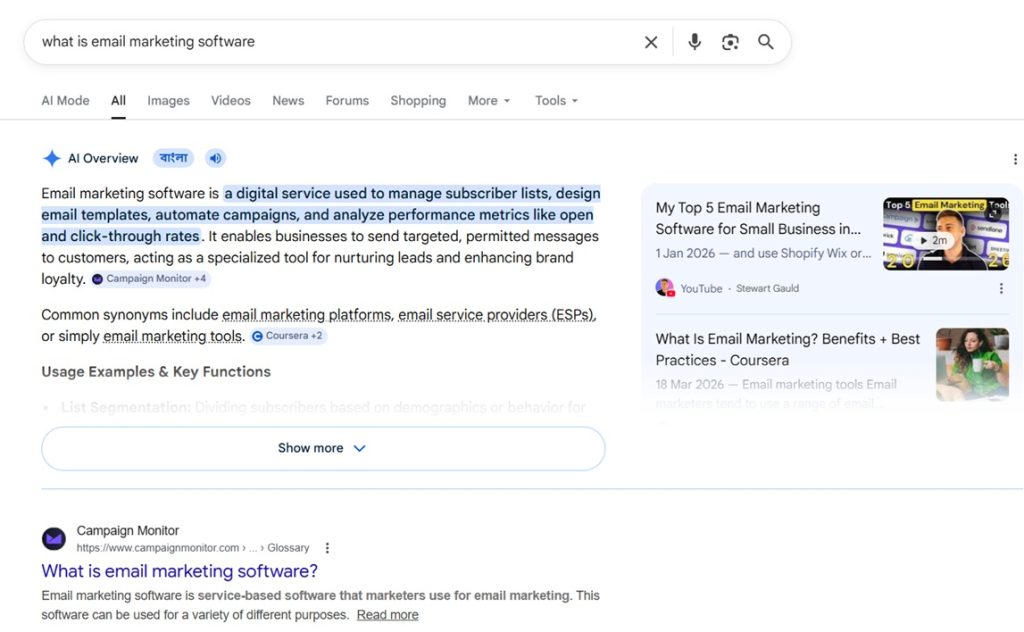
Here, the user just wants to know what email marketing software is. Even if you rank for this keyword, your conversion rate will be super low.
Because people who are searching for this kind of keyword are not in a buying mode. They’re just looking for information.
If you have a business and you sell a product/service, you should target keywords having business value.
Search Volume
Most people think that if they target keywords with high search volume, they will get more traffic.
On the surface, it makes sense.
But to get traffic, you need to rank your web page on the SERP.
Typically, the higher the search volume, the more competitive the keyword is.
Still, many SEOs make this mistake. Initially, I made this mistake too. Once I understood the game of search volume, my organic traffic started to grow.
If your website is new, you should go after keywords with 50-150 monthly search volume.
Keyword Difficulty
Keyword difficulty, or KD, is a metric that shows how competitive a keyword is.
The higher the KD is, the harder it is to rank the keyword.
Every keyword research tool shows you the keyword difficulty.
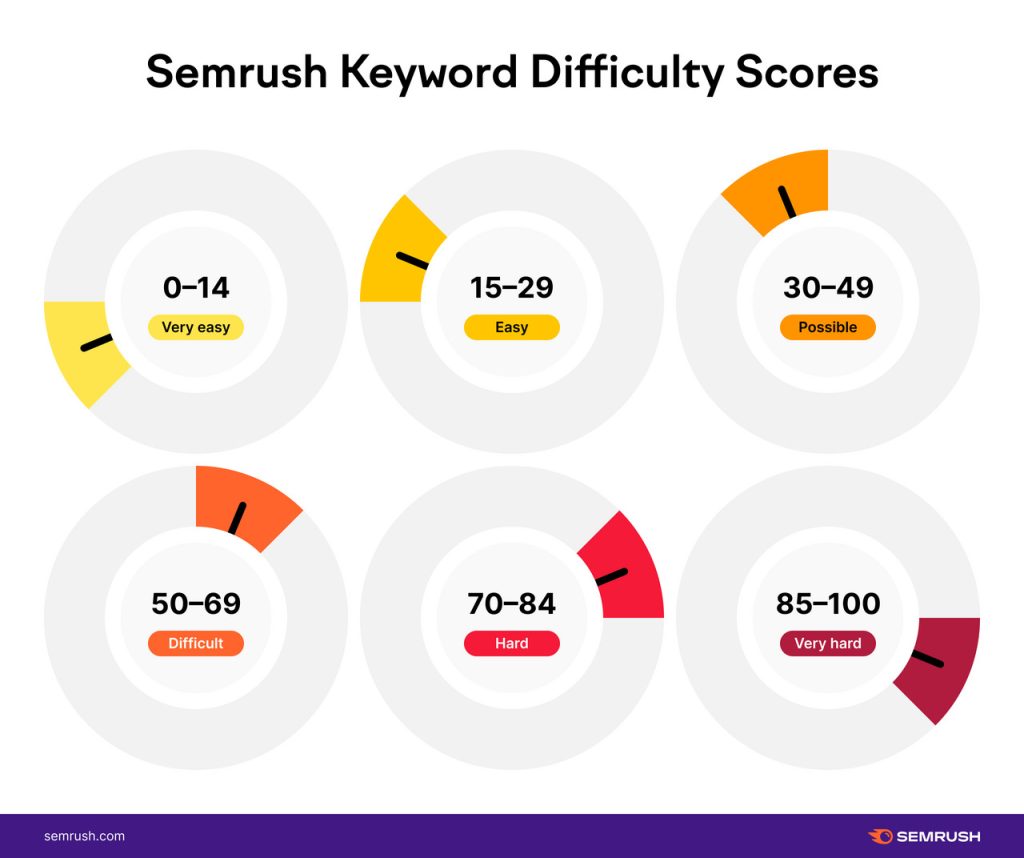
Source: Semrush
You should choose keywords with a KD score of less than 20.
How To Do Keyword Research
Now you need to do the keyword research to find relevant keywords.
I’ll be using Semrush for keyword research. You can use any other tool.
Hop onto Semrush and enter your topic. I’ve entered “crm software”.
Now use the filter to filter out the keywords. I’ve set the KD between 15 and 29 with a 6-word count minimum.
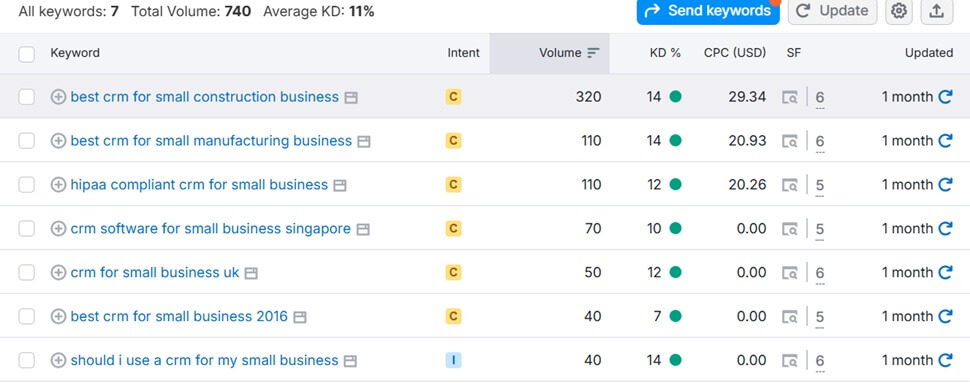
Within a few minutes, I found some relevant keywords.
Once you have found some relevant keywords that can go after put them in a spreadsheet. Use these keywords while creating content.
You can play with the keyword research tool to learn about all the features.
Step #3: Create Amazing Content
Every SEO blog on earth suggests creating amazing content.
But not many blogs actually show how to create amazing content that people.
Well, you’re going to find out.
First, Google your keyword and analyze all the web pages ranking on the first page. If you believe you can create better content or add some real value, go for it. Otherwise, don’t create content on that topic.
Just having this mindset will significantly improve your content. Having this mindset shift will not let you create mediocre content.
And you don’t need 5 years of experience to create amazing content.
Some tips to create truly amazing content even if you’re just getting started.
- Find a different angle
- Share your experience
- Conduct original research
- Add unique case studies
- Interview experts
- Use Multimedia
- Make your content scannable
Read Also:
Find a Different Angle
Before writing a single content piece, Google your target keyword. You’ll see that most content is quite similar. Don’t try to copy them.
Ask yourself what you can cover that no one else is covering. Try to find an angle no one has covered on their website yet.
You need to add a “WOW” factor. After reading your content, people should feel wow.
It will help you be memorable. People are going to keep coming back to your website.
Share Your Experience
How can you stand out? By sharing your experience.
YES.
No one has your experiences. They’re unique to you. This way, you can beat AI-written content as well.
Because AI can’t replicate your experiences. AI can come up with what’s already there on the web.
I try to share my experience on each blog post.
Add Unique Case Studies
Case studies show that you know what you’re talking about.
Your reader thinks: “Hmm, if it’s working for someone, it might work for me as well.”
Having case studies helps build trust with the reader.
Walk your reader through a real example of how you solved a problem.
- Problem
- Approach
- Result
That’s it.
Even a short case study can help you convince your readers.
Interview Subject Matter Experts
Now, many blogs are interviewing subject matter experts to create amazing content.
If you’re not an expert on the topic you’re writing about, you can interview experts and include their tips or quotes.
Ahrefs often interviews subject matter experts on its blog.
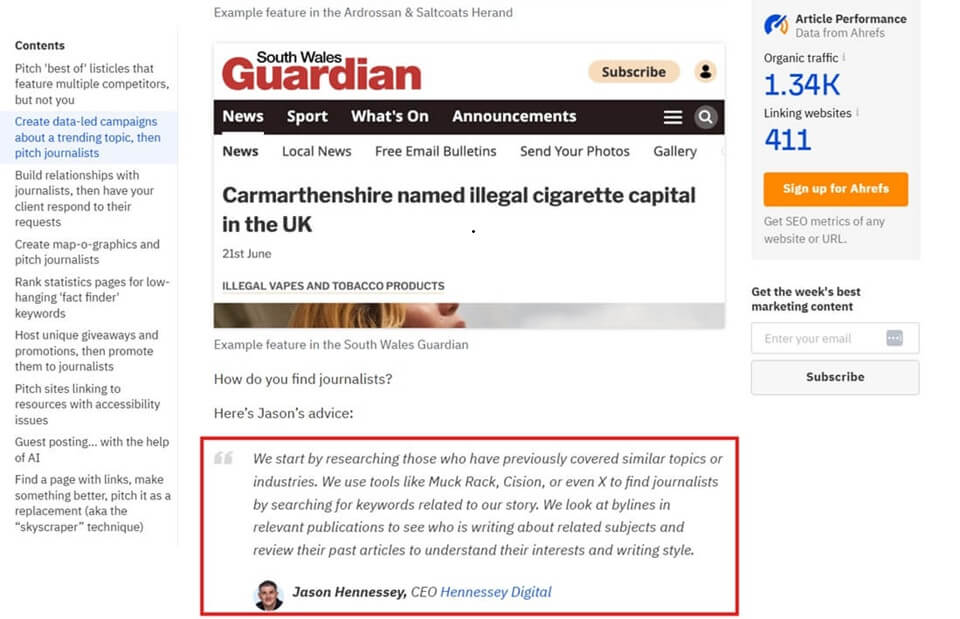
You can use a platform like Featured or Qwoted to interview experts.
Use Visuals

MIT neuroscientists found the brain can process images in as little as 13 milliseconds. That’s faster than a blink. Your readers are absorbing visuals before they’ve even consciously decided to read.
A complex topic is easier to show than to explain in text. You can create an infographic to make the complex topic simple.
You can add videos to your website as well. And you don’t need expensive tools to create videos. You can simply screen record using Loom or Vidyard. And integrate the video into your content.
Make Your Content Scannable
Most people don’t read your content. They just scan with their eyes.
You need to make sure your content is scannable.
Some tips to make your content scannable:
- Use short sentences and paragraphs
- Break up the wall of texts with subheadings
- Use bullet points for lists and steps
- Have white space. Let your content breathe.
You can see how I’ve opted for short, punchy sentences to make the content easy to digest.
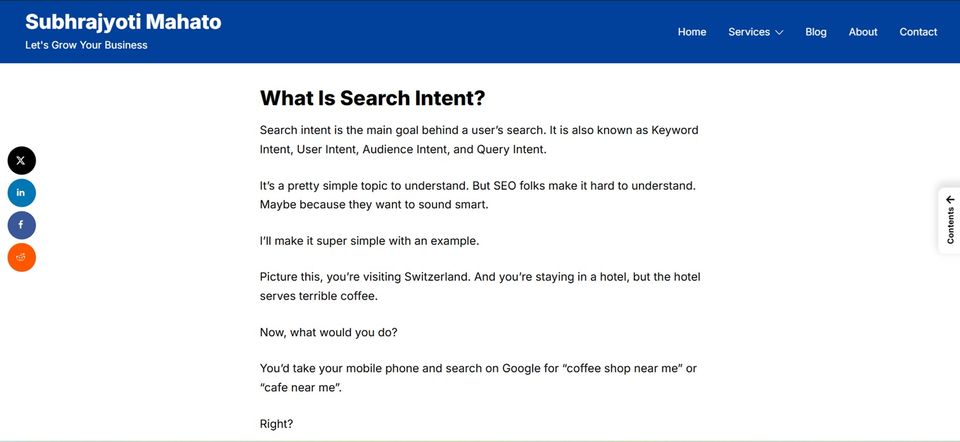
If your content looks hard to scan, your readers are going to bounce back from your website.
Step #4: On-Page SEO
On-page SEO is the practice of optimizing a web page for search engines. It includes optimizing the title tag, meta description, URL, image, internal links, and schema.
Title Tag
The title tag is the text that shows when you Google a keyword. It’s a ranking factor.
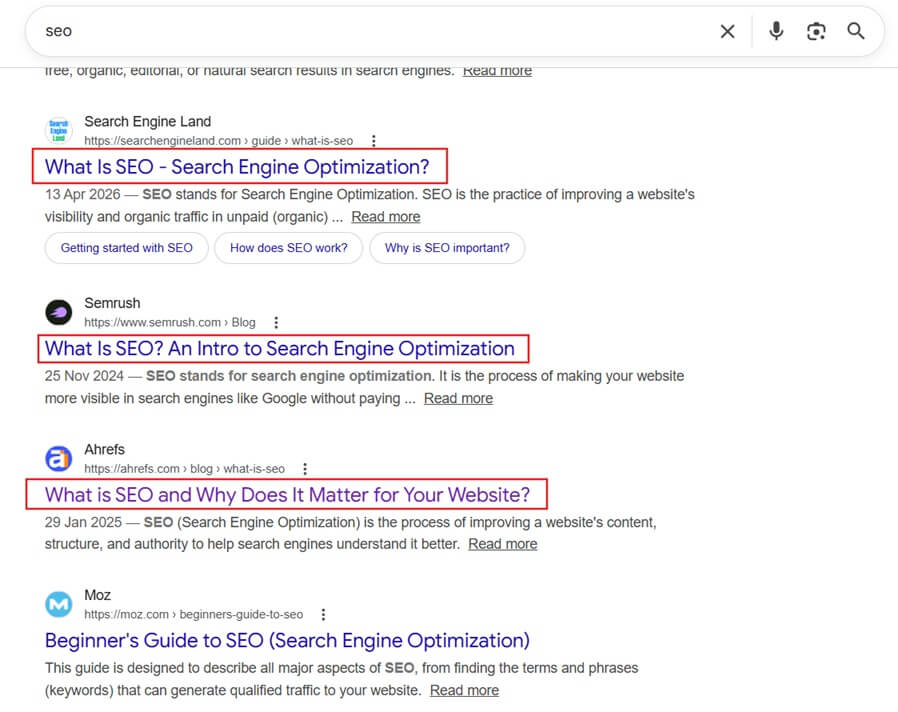
You can’t just write an ugly and super-long title tag and expect to rank higher on Google.
You need to write a SEO friendly title tag. You can include your keyword.
You can use AI to come up with a solid title tag.
Meta Description
A meta description is text that shows up below the title tag. Though it’s not a ranking factor, it can influence your organic click-through rate (CTR).
Sometimes, Google doesn’t use your meta description and generates an automated meta description.
But still, it’s worth writing a meta description for each page.
Here are some meta description best practices:
- Write a unique meta description for each page
- Keep it under 160 characters
- Show the benefit
- Include your target keyword
URL
Google uses the URL to understand what your web page is about. It also helps users understand if they’re landing on the right page.
Here’s how you can write URLs to make Google and users click on your website:
- Write short URLs
- Include your target keyword in the URL
- Separate words using a hyphen
- Don’t change your URL structure unless it’s necessary
Image SEO
As I mentioned, adding images is important to help the reader understand the content better.
You need to use images, screenshots, and infographics to make your content look awesome.
Alt text (alternative text) is an important attribute. It describes the image for those who cannot see it and helps Google index it for relevant keywords.
Image SEO tips:
- Use a relevant name for your images. It should look like mens-navy-blue-running-shoes. Not IMG_0023.jpg
- Use descriptive ALT texts like “Men’s navy blue running shoes with white soles on a wooden floor.”
- Compress your images for quick loading. I use Tiny PNG for image compression.
Internal Links
Internal linking is an underrated SEO strategy. Both Google and users use internal links to find pages on your website.
It can help you improve the ranking of your low authority pages. You just need to interlink them with authority pages.
Let’s say you have a page that is getting good traffic and authority. And you’ve some new blog posts that are getting little to no organic traffic.
If you interlink these posts, it can pass the link juice from high authority pages to low authority pages. As a result, the low-traffic page will rank higher on Google.
Make sure the pages you’re linking to are relevant. Don’t use internal linking for the sake of ranking.
Schema
Google clarified that using schema has no impact on rankings. But still, you should use it.
Why?
Schema tells Google what type of content you have on your page.
Plus, it can help with answer engine optimization (getting featured in AI answers).
You can see that these websites are using recipe schema.
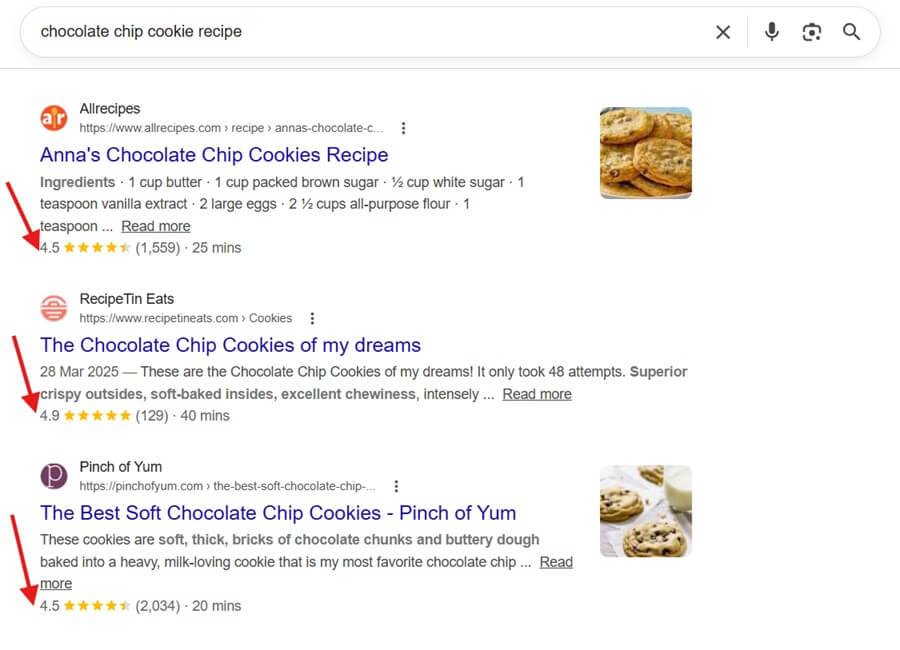
Here are some schemas that you can use:
- Recipe: Includes cooking time, calories, and ingredients—essential for “Recipe Cards” in search results
- FAQPage: Lists questions and answers. These can appear directly in the search results (Rich Snippets)
- HowTo: For step-by-step guides, often showing images for each step
- Organization: Basic info about a company (logo, address, social profiles)
- Product: Includes the name, image, and description of an item
- LocalBusiness: Crucial for physical stores; includes opening hours, price range, and physical location
- Person: Used for authors or high-profile individuals to establish expertise (E-E-A-T)
You test your schema using Google’s Rich Results Checker.
If you’re using an SEO plugin like Yoast SEO, you can set up schema.
Step #5: Build Backlinks
A backlink is a link pointing from one website to another website. Backlinks are among the confirmed ranking factors.
Having high-quality backlinks pointing to your web page can boost your rankings.
You need to build backlinks to your website from authoritative websites. Make sure you check your target website’s authority before building links.
Here are some effective link-building techniques:
Guest Posting
Guest posting is the process of writing and publishing a blog post on another person’s website. Some websites allow editorial links on these guest posts.
Even if they don’t allow editorial links, an author bio link can be beneficial.
Here’s the process:
Find Target Websites That Accept Guest Posts: You can use Google to find guest post targets. Use these strings: “topic + write for us”, “topic + guest post”, and “topic + become a contributor.”
Pitch Them: Most websites have their guest post guidelines. You need to follow them to get accepted. Craft a solid email pitch and send it to your guest post targets. Make sure you research the website and the person you’re pitching to.
Here’s a template:
Hi [Name],
I was just digging through your recent posts on [Topic]—the piece on [Specific Article Title] really hit home, especially the point about [Specific Detail].
I noticed you’ve covered [Topic A] and [Topic B] extensively, but haven’t touched much on how [Specific Sub-topic] is changing the game for [Target Audience].
I’ve been experimenting with this lately and have some fresh data/insights that your readers might find useful. Would you be open to a guest post that fills that gap?
If not, no worries at all—keep up the great work on the blog.
Best,
[Your Name]
Write the Post: Once they approve the topic, write the post. Make it unique and super detailed.
Broken Link Building
Broken link building is simple. You find broken links on websites and reach out to the editor/author and offer your link as a replacement.
Let’s see how you can find broken links:
List down 5-10 Competitors: Hop onto Dr Link Checker and enter your competitor’s domain. Now click on the “Start Check”. It will take some time to find the broken links.
Once you find the broken link, you need to reach out to the author.
You write something like:
Subject: Shared your article + a quick fix for you
Hi [Name],
Huge fan of the recent piece you did on [Topic]. I just gave it a shout-out on my [Twitter/LinkedIn] because your take on [Specific Insight] is something people usually get wrong.
I did notice one small thing while I was re-reading it: the link you have pointing to [Dead Resource Name] is currently broken.
Since that’s such a core part of the article, I thought you might want to swap it out. I recently put together an updated guide/tool for [Your Topic] that might fill that gap perfectly for your readers.
No pressure at all, just thought I’d return the favor since your content has been so helpful to me.
Cheers,
[Your Name]
Resource Page Link Building
Resource page link building is the strategic process of earning backlinks from curated web pages that aggregate comprehensive guides and industry insights.
You can see in the screenshot. The content has links to multiple resources.
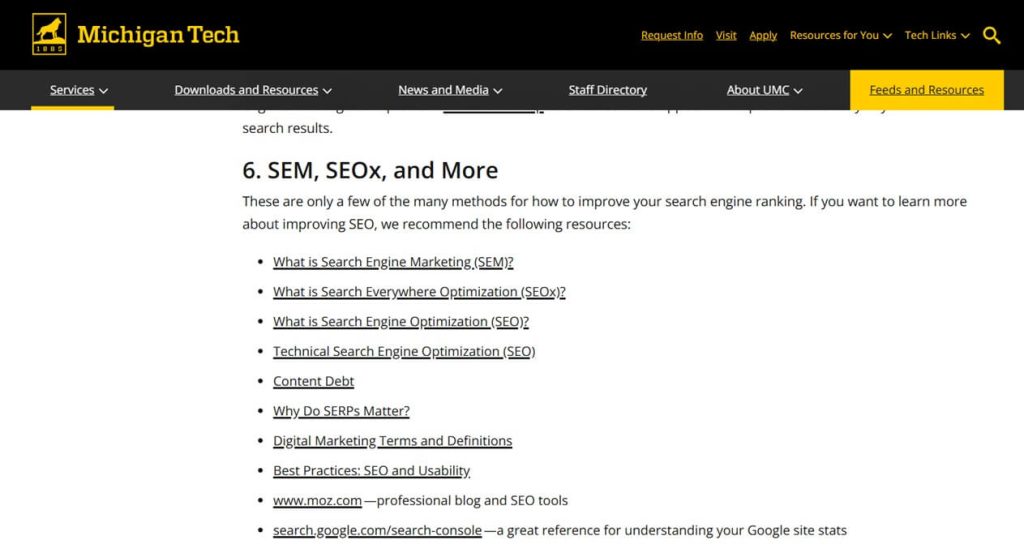
Your content should be detailed and valuable. Otherwise, why would someone link to your content?
You need to keep it in mind while creating the content.
Here’s the process:
Find Resource Pages: You can Google for “your industry” + intitle: or inurl:resources. It will show our resource pages in your industry. Then you can reach out to the person who handles the website.
Send the Pitch: You need to send a pitch to the author of the content.
Here’s a sample pitch:
Hi [Name],
I was browsing your resources at [Page URL] and wanted to thank you for the helpful list.
I recently put together a comprehensive guide on [Topic] that goes deep into [Specific Detail]. Given your audience’s interest in [Niche], I thought it might be a nice addition to your “Recommended Reading” section.
You can check it out here to see if it’s a fit: [Link]
Either way, keep up the great work with the site!
Best,
[Your Name]
Again, don’t copy-paste the template. Tweak it and personalize it.
If you want more tactics to build links, check out this link-building strategies guide.
Step #6 Track Your SEO Progress
Doing SEO is a lot of work. But how do you know your SEO efforts are giving you results or not?
By tracking the right SEO metrics. You use Google Analytics and Google Search Console for that.
You should have set up both tools before creating the first SEO campaign for your website. These tools are super helpful.
Here’s a video that can help you set up your Google Analytics.
What are the SEO metrics you should track?
- Clicks
- Organic Traffic
- Traffic Cost (Most important)
- CTR
- Keyword Rankings
- Bounce Rate
You can track all these metrics using Google Analytics, Search Console, and Semrush.
Conclusion
These are the steps you need to take to do SEO for your website. It’s a lot of work. But it will be worth all your effort. Once you see the ROI, you’ll believe in SEO for the rest of your life.
SEO is a long-term game. Most people give up too soon. You need to give at least 6 months to 1 year for your SEO to take off.
If you’re in a low-competitive industry, you can see results in 3-6 months as well. You need to keep creating content and building links to your valuable pages.
Let me know if you’ve any questions.