Want to grow your business without spending on paid ads?
Small business SEO can help you get in front of your potential customers.
This guide covers everything you need to know about small business SEO in 2026.
After reading this, you’ll know how to:
- Drive more organic traffic to your website
- Generate leads through SEO
Let’s get started.
What Is Small Business SEO?
Small business SEO is the process of optimizing a small business’s website for search engines like Google to increase its visibility in organic search. It includes on-page SEO, off-page SEO, technical SEO, and Google Business Profile optimization.
When done right, SEO can be a profitable marketing channel for your business. Because it helps you drive targeted visitors to your website.
If you’ve a SaaS business, check out actionable tactics to increase your organic SaaS traffic.
Why SEO Is Important For Small Businesses?
SEO is one of the most effective marketing channels to grow a business.
Paid ads can help you get immediate visibility and traffic. It stops the moment you spend paying for ads.
It’s not the case with SEO. When you optimize your website for search engines and create content, you’ll build assets. And these assets will keep giving you returns for a longer period.
Plus, SEO can help you drive targeted visitors to your website. When people search for something, they’re more likely to take action.
Still, not convinced?
Here are some benefits of SEO for small businesses:
Benefit #1: Targeted Traffic
When you target the right keywords, your website receives targeted visitors who are ready to buy your products/services.
Read Also: SEO vs. AEO: Which One Actually Drives Traffic in 2026?
Benefit #2: Better Long-Term ROI:
Once you start ranking for your target keywords, you’ll keep getting visitors and sales for months or years.
Benefit #3: Build Trusts
People trust organic results more than paid ads. They will start trusting your brand. And trust is a super important transaction.
Benefit #4: Build A Stronger Brand
When you consistently show up for relevant searches, users keep your brand top of mind. Over time, you’ll build a stronger brand. And you’ll get more direct traffic and branded searches.
Read Also: SEO Stats For 2026
How To Do SEO For Small Business
If you’re doing SEO for the first time without any guidance, it can haunt you at midnight. I mean, it’s hard to get a website on the #1 page of Google
But if you’ve a proven SEO playbook, it will make everything easier.
Below, I’ll share actionable small business SEO strategies for small businesses. So you get real results without guessing.
Set Your SEO Goals
First of all, you’ve to set your SEO goals.
Define your business outcome. It will be different for each type of business.
Let me explain with some examples:
- Home service businesses (e.g., roofing, plumbing, HVAC, etc): Getting 30 customers per month.
- Ecommerce businesses (e.g., a store selling ergonomic chairs): It might increase organic revenue by 20% year-over-year (YoY).
Once set your goals right. It will help you create a solid small business SEO strategy for your business.
Keyword Research
A good SEO strategy starts with a solid keyword research approach.
Keywords are the terms that people are searching for on search engines like Google and Bing.
Many people ignore keyword research and start doing SEO. It’s the worst mistake you can make in SEO.
Doing keyword research will help you identify relevant keywords people are searching for.
And understand the intent behind the keyword. When you understand these two keys of SEO, you can get far ahead of your competition.
When you’re starting, go after long-tail keywords and high buyer intent keywords.
Why?
Because long-tail keywords are less competitive and convert better than short-tail keywords.
Even if your website has some authority, you should still target long-tail keywords.
What are long tail keywords?
I hear you ask.
Long tail keywords are keyphrases that contain 3 or more words.
Here’s how you can find long-tail keywords.
Using keyword research tools:
There are dozens of good keyword research tools.
#0 Using Google Keyword Planner:
Google Keyword Planner (GKP) is designed to help advertisers find relevant keywords. It allows you to find relevant keywords, CPC, keyword difficulty, volume, and other metrics.
As GKP is designed for Google Ads, the keyword difficulty it shows is for paid ads, not SEO.
Head over to Keyword Planner and create a Google Ad account to use the tool.
Once your account is ready, go to Keyword Planner and enter any topic in your niche. It will show you the keywords people are searching for.
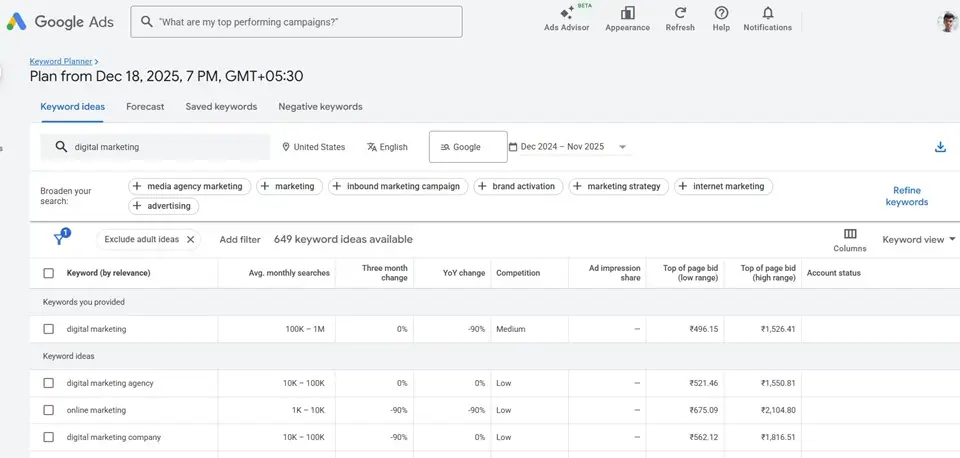
Export the keywords as CSV.
Next, open it using Excel or Google Sheets.
Find long tail and relevant keywords. And create another spreadsheet and put the relevant keywords.
#1 Using Keyword Research Tools
There are dozens of keyword research tools out there. I like to use Ahrefs, Semrush, and Ubersuggest.
These are FREEMIUM tools. If you want full access, you’ve to pay.
If you’re just getting started, the free versions are enough for you. I use all of them to find keywords.
You can use these tools to find long-tail variations of your keywords.
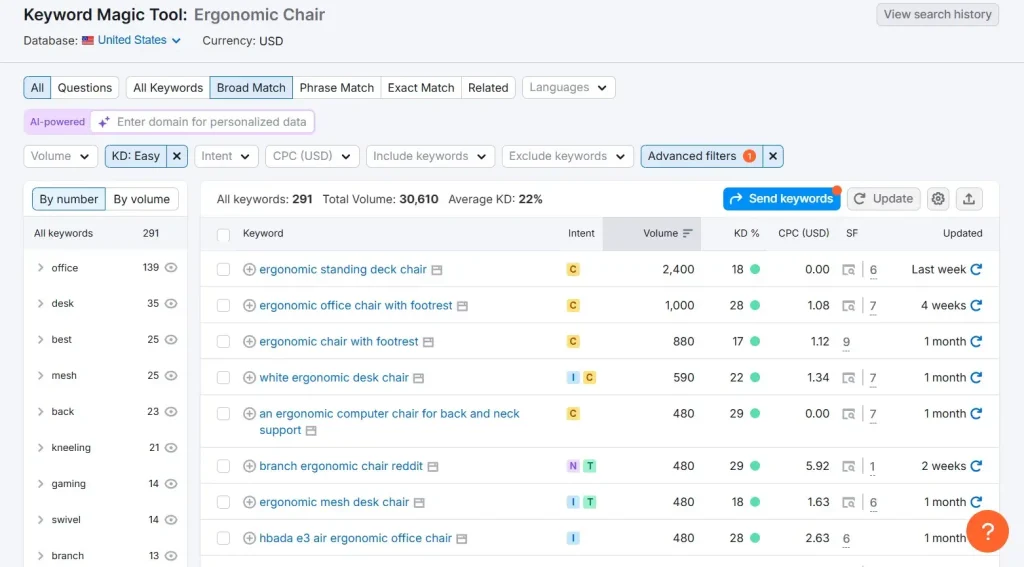
I’ll show how to use Semrush to find long tail keywords.
Head over to Semrush and create a new account. Log in to your account if you already have one.
Now, click on the Keyword Magic Tool.
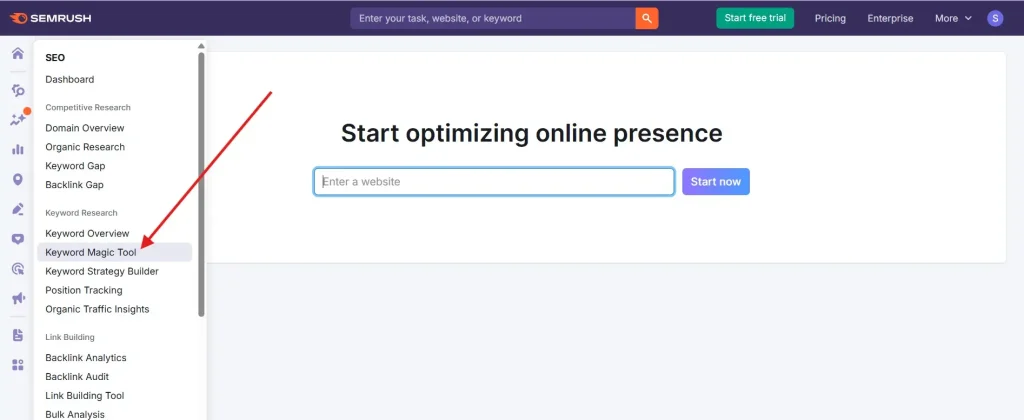
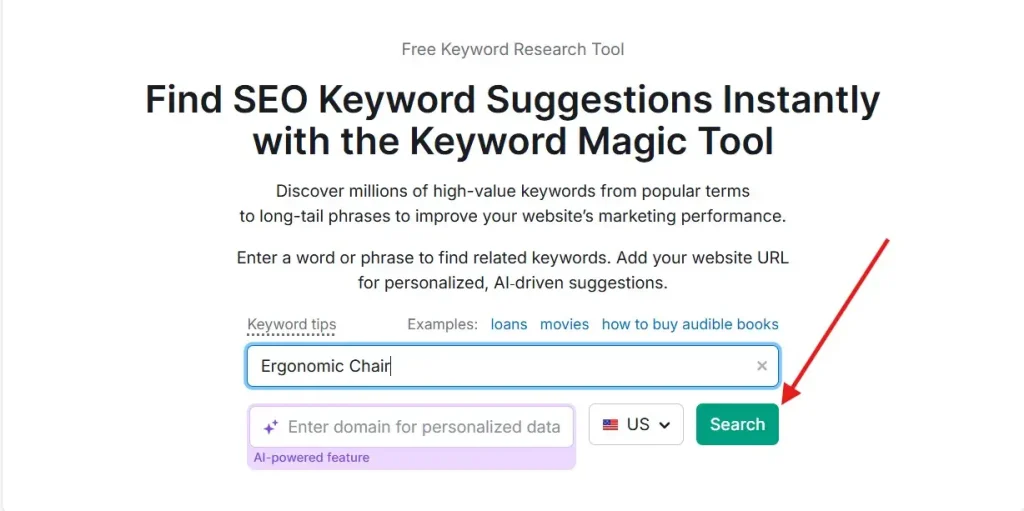
Enter your topic and click on the search button.
Next, click on Advanced filters. Use the filter for the number of words. Set it to a minimum of 4 words.
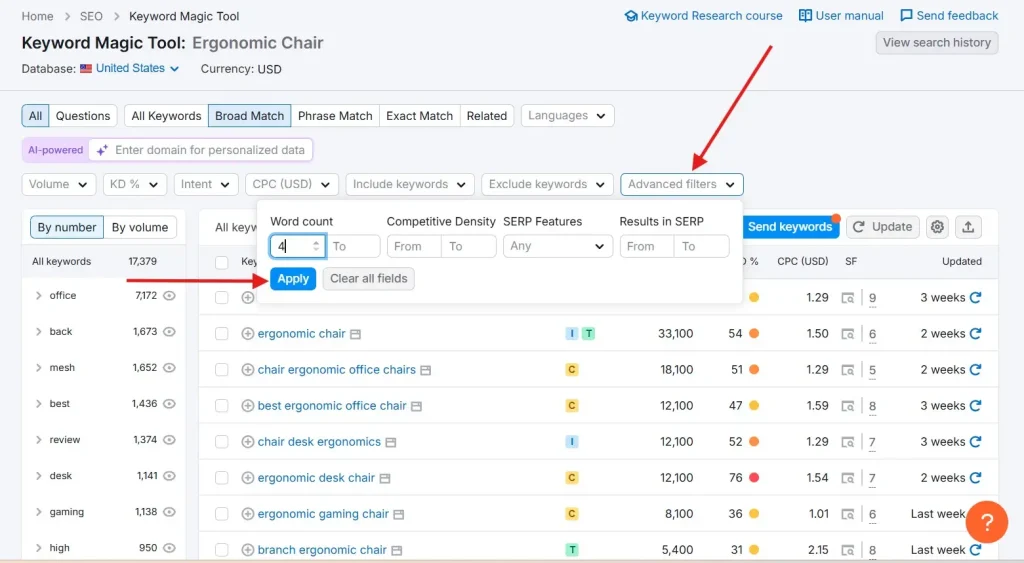
And it will show you long tail keywords. I’ve used the KD filter as well. You can see it’s showing low competitive keywords.
#2 Using Google Auto Suggest
When you type any keyword, Google suggests related keywords.
Head over to Google and enter your keyword.
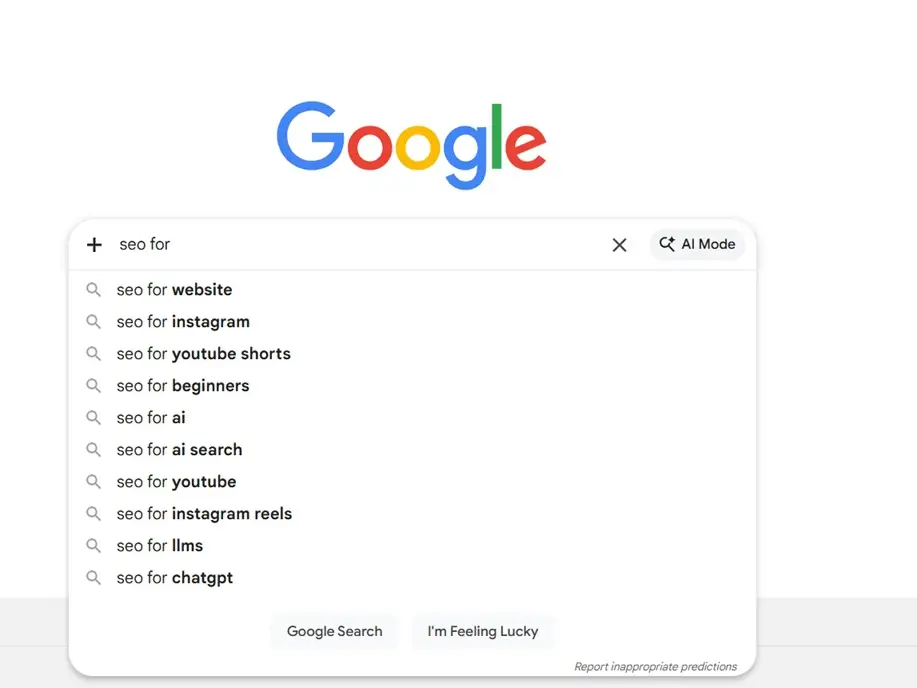
You can see that Google is suggesting related keywords.
These keywords can be gold for your business. As these are coming from Google, these keywords are super relevant, and people are searching for them.
Super fun, isn’t it?
These two methods are super effective for finding long-tail keywords.
Let’s see some other ways to find long tail keywords.
3. Quora
Quora is a Q&A platform where people can ask questions and answer others’ questions.
People use Quora to ask questions. You can find in every topic under the sun.
If you search for your topic on Quora, chances are you’ll find some relevant questions.
Visit quora.com to create an account. Now you are good to go.
Enter your topic, and it will show you the questions that people are asking on Quora.
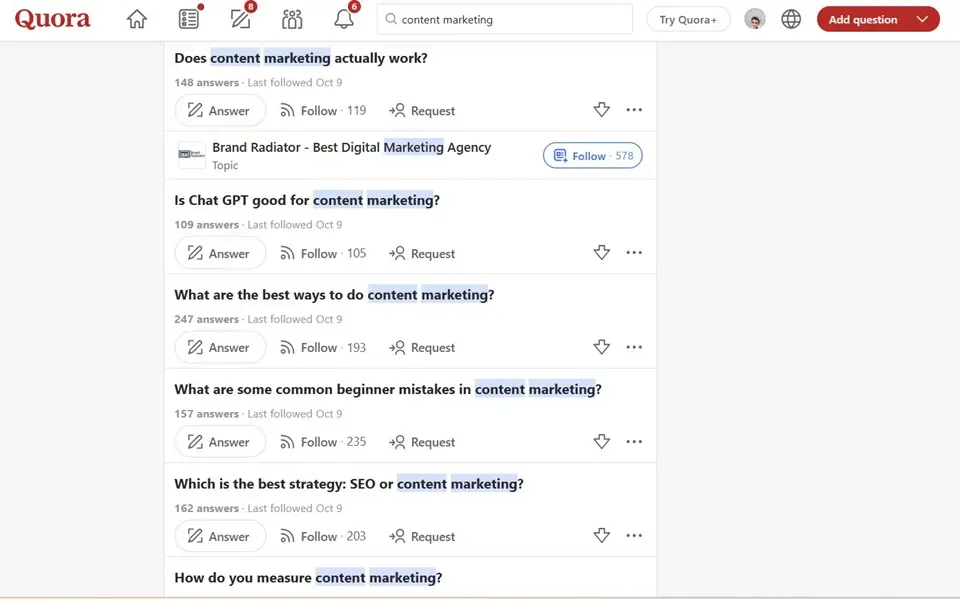
Now, find some relevant questions and put them in any keyword research tool to find search volume and keyword difficulty.
4. Reddit
Reddit is a popular discussion platform. When you Google for specific terms, you might have seen results from Reddit.
You can find sub-reddits under any topic that you can join. It shows you what people are talking about a specific topic.
I typed “Blogging” in the Reddit search bar, and you can see that many results are showing.
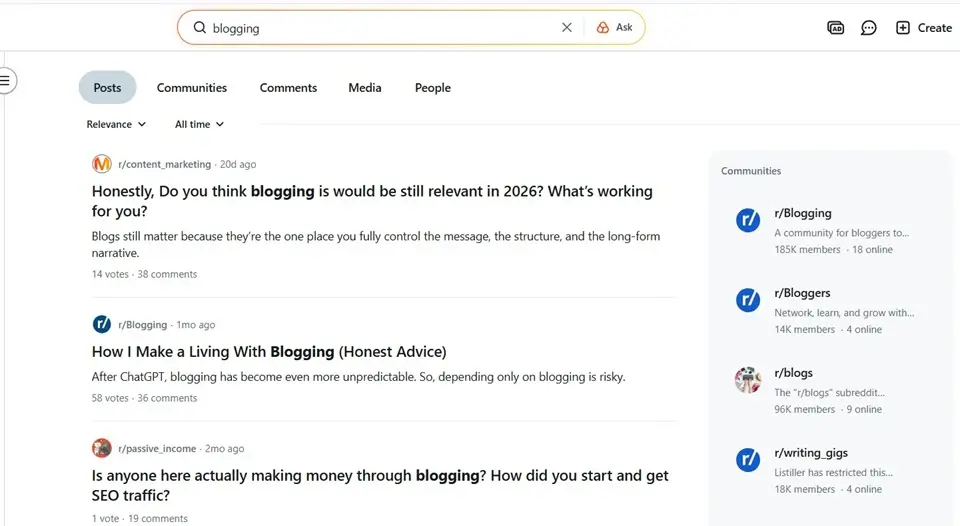
I use Reddit for keyword research. Recently, I wrote THIS blog post: Is small business SEO worth it for small businesses?
You guessed it right, I found this topic while browsing Reddit.
By using all these methods, you’ll have a handful of keywords to target.
Create a spreadsheet and put all the keywords. If you follow all these methods, you’ll have 1 year of content ideas.
Now create content around those keywords.
When it makes sense, add relevant keywords in your existing blog posts.
Create Content
It’s time to create content. Before creating content, make sure you choose keywords that have business value.
What does that mean?
You need to understand the intent behind the search. When you understand the intent, you can figure out if a keyword has a business value or not.
Here’s an example for you:
Informational: “Why is my skin so dry in the winter?”
Commercial: “Best moisturizing body butter for sensitive skin.”
Getting traffic is good. But traffic doesn’t pay the bill. So you can promote your products/services in your informational content as well. But it should be relevant and make sense. I recommend doing it later.
To stand out, your content needs to be unique and thorough.
How can you make your content unique?
Here’s a quick tip for you.
Google your topic. And analyze the top results. Ask yourself how you can make it better.
- Can you make it more in-depth?
- Can you share some unique data and statistics?
- Can you share your experience?
- Can you find a different angle?
You need to spend time researching to make your content unbeatable.
Take your time to write the content. It can take some time, especially if you are a beginner.
If writing is not your cup of tea, you can hire a freelance writer on Upwork or Fiverr to write for you.
Make sure you hire only expert writers who have experience in your topic.
Check their writing samples before hiring.
On-Page SEO
On-page SEO is the process of optimizing your website and content for search engines like Google. You’ve full control over it, unlike off-page SEO.
Some basics of on-page SEO.
Title Tag
The title tag is the text that shows on the SERP.
Here you can see a title tag.
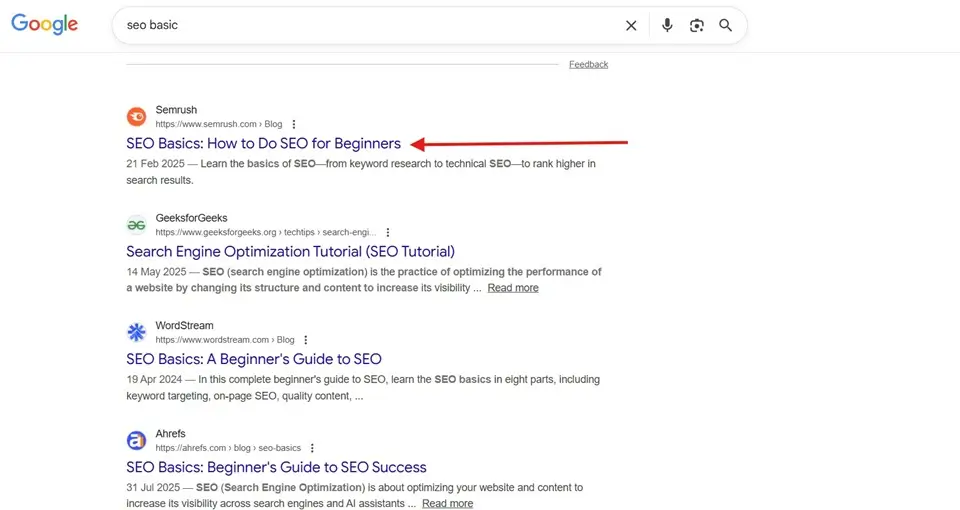
It is super important because it’s the first thing people notice. Based on the title tag, people decide if they click or not.
You’ve two goals here.
The first one is to make it attention-grabbing. It should catch your audience’s attention and convince them to click.
And the second one is to make it SEO-friendly. Including your target keyword will make it SEO-friendly.
Here are some good title tag examples:
- How to 10x Your Organic Traffic Without Spending a Dime on Ads
- How to Build a Personal Brand That Attracts High-Ticket Clients on Autopilot
- How to Write Email Subject Lines That Demand to Be Opened
- Why Most SEO Strategies Fail Within the First 3 Months
You can use AI tools to come up with title tag ideas.
Neil Patel has an awesome guide on writing blog headlines.
Meta Description
Meta description is a small text that describes a web page. It shows below the title tag on the SERP (Search Engine Results Page).
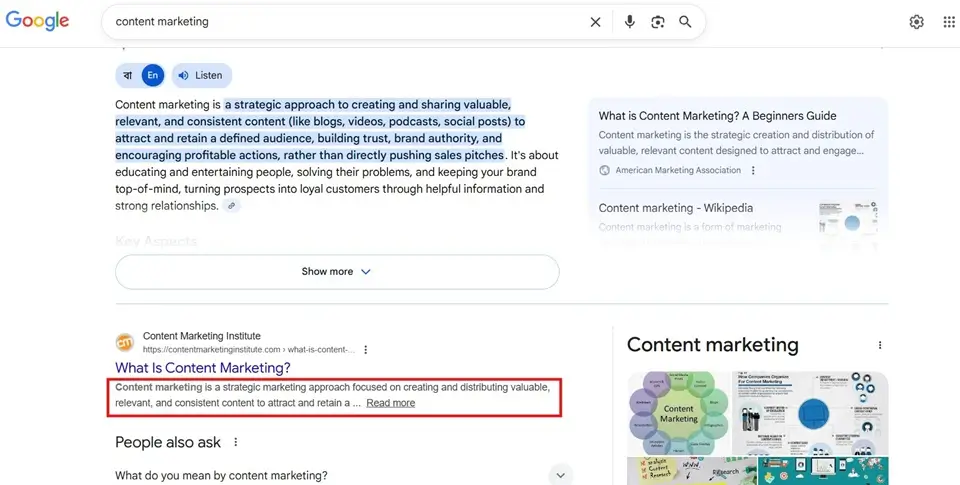
You need to let people know what your page is about. And it’s your second chance to convince people to click on your website.
Here’s what Google says about meta descriptions.
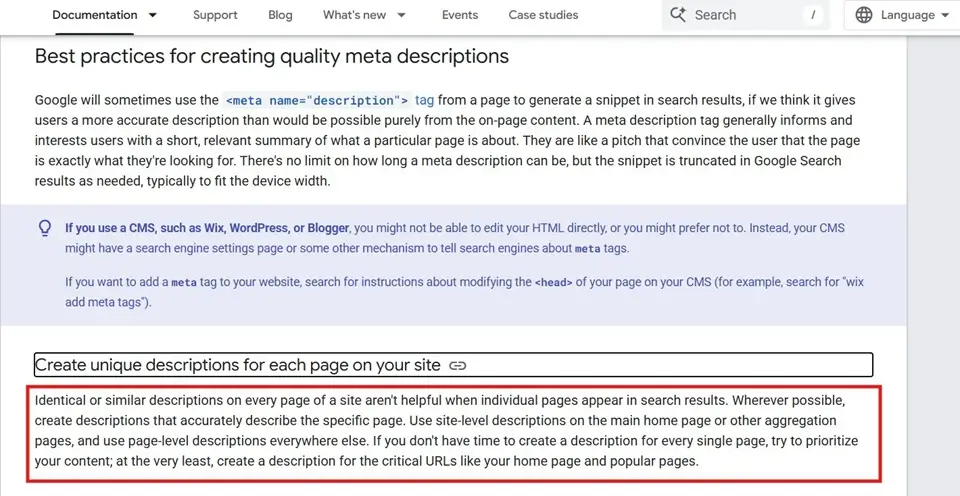
Some best practices for writing a meta description
- Keep it under 160 characters
- Include your keyword
- Show your users the benefit
- Write unique meta descriptions for each page
- Use Call To Action (CTA) when it makes sense
Sprinkle Keywords
Make sure you use keywords naturally in your web pages. Don’t force keywords where they don’t make sense.
Google is pretty smart, and it can sense if you try to force keywords in your content. Make sure you don’t overoptimize your web pages.
Internal Linking
Internal linking is the process of linking one page to another from the same domain. It helps both humans and search engines to find content on your website.
You need to link your web pages with each other. Make sure they are relevant and add value to your users.
Google Business Profile
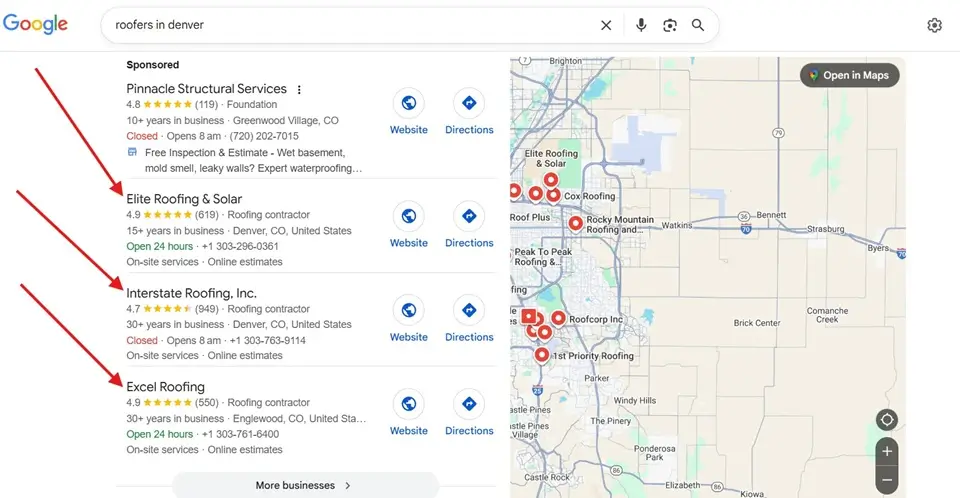
Google Business Profile is a FREE service for small businesses to manage their online presence on Google search and Google Maps.
If your business has a physical location, create a Google Business Profile. And verify your address.
It will help you rank for on map pack. Even if your website doesn’t rank on the first page, your Google Business Profile can rank on the #1 page. It’s one of the best SEO practices for small businesses.
You can see below.
Fix Technical SEO
Technical SEO is the backbone of your SEO. If something goes wrong with your technical SEO, search engines will struggle to find your website.
You can use Screaming Frog to perform a technical SEO audit. It will help you find the technical errors on your website.
You can also use Semrush to perform a technical audit.
Technical SEO is an important and broad topic. If I cover everything here, it would be a super-long post.
So here’s a video from Ahrefs.
Off-Page SEO
Off-page SEO includes link building, digital PR, and social media engagement.
Backlinks are one of the most important ranking factors. If you want to rank higher on Google, you need to build links to your website.
Here are some ways to build links to your website:
- Blog Outreach
- Digital PR
- Infographics
- Broken Links
- Guest Blogging
As a small business owner, you’ve the advantage of having less competition than large brands. You can rank your website higher on Google with fewer links.
But before building links, you need to check your target website’s authority.
You should be on social media to promote your business. For small businesses, Facebook and Instagram work well.
Track Your SEO Performance
Not tracking your SEO performance is one of the biggest mistakes you can make.
You can’t manage what you don’t measure. Without tracking, you’re just guessing whether your SEO is paying off or not.
Start tracking your SEO metrics. Here are the SEO metrics you should track:
- Conversions
- Traffic
- Keyword Rankings
- CTR
Set Up Google Analytics
Google Analytics is a web analytics tool.
It can help you track:
- Website Visitors
- User Behavior
- Traffic Sources
- Leads
- Conversions
You can see which posts are driving you more conversions and leads. And you can double down on what’s driving leads and sales.
Set Up Google Search Console
Google Search Console is a must-have SEO tool. It helps you track your website’s SEO performance.
If you are not using it, you are leaving organic traffic on the table.
Here’s what GSC can do for your website:
- Submit sitemaps
- Fix crawl errors
- Track search queries
- Analyze click-through rates (CTR)
- Monitor impressions
- Measure the average position
- Identify security issues
- Manage manual actions
- Measure loading speed
Once you set it up, you can see the keywords that are getting your website impressions.
These are keywords that can help you drive more visitors from Google.
Now let’s see how you can set it up.
- Go to Google Search Console.
- Now, click on Add New Property.
- Choose the URL.
- Now, verify the domain ownership, and you’re good to go.
Further Reading: What Is Google RankBrain?
Conclusion
This is my complete guide on small business SEO. Many businesses are hesitant to invest in SEO. Maybe because SEO doesn’t provide immediate ROI.
But when it comes to ROI, SEO is a super effective marketing channel. SEO takes time to work. Once you rank for your target keywords, you can get traffic and sales for months if not years.
In short, it will be worth your effort and time.
Are you focusing on any of these SEO strategies? Let me know in the comments.