There are over 200 Google ranking factors.
Does that mean you need to focus on all 200 ranking factors to rank higher on Google?
Nope.
You just need to focus on the most important Google ranking factors.
Let’s see the Google ranking factors list.
And how to optimize for those factors.
Factor #1: High-Quality and Helpful Content
Creating high-quality and helpful content is non-negotiable. When people type a query on Google, they’re looking for a solution.
And your goal is to provide the solution. Try to help them genuinely.
Google wants to provide the best content on the SERP. They track how your users interact on your website.
So users keep using Google.
And if you want to rank higher on Google, you need to provide high-quality content.
It needs to satisfy the user intent. That should be your main goal while creating your content.
Search for a keyword on Google. And analzye the top 10 results.
Look at the type of pages ranking on the SERP.
I’ll explain with an example.
I Google “eggless caramel custard recipe”. You can see recipe articles are ranking at the top.
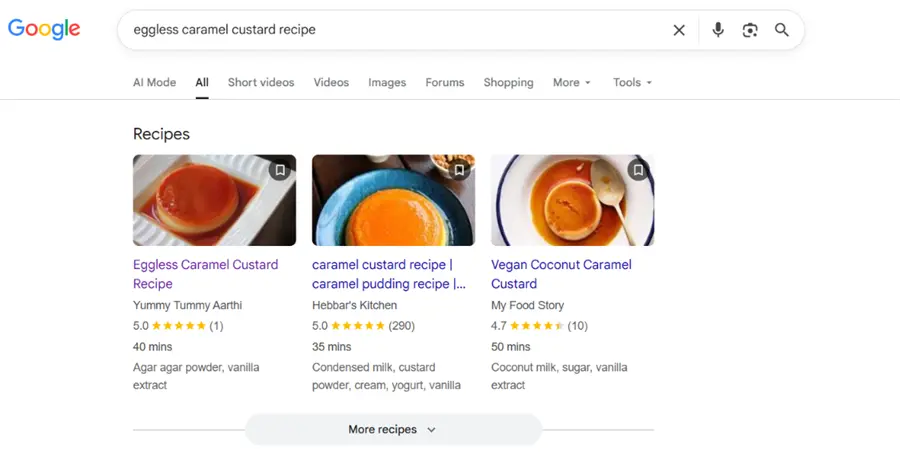
The web pages are using recipe schema. That’s the reason they’re showing under the recipe section.
Here’s what I found after analyzing the top 3 posts.
- The content is human-written
- Easy to understand content
- They have added videos as well. It helped them to increase time on site
- No fluff
- Used schema
- Satisfied the search intent
High-quality content doesn’t have to be a 5,000-word guide. It doesn’t make sense to write comprehensive posts for each keyword.
You need to solve their problems. It has nothing to do with word count.
Here’s a checklist you can follow.
- Is this solving your users’ problems?
- Can a layman understand this?
- Will people share this content after reading?
When you create content, keeping these in mind, your content quality will improve.
How To Create High Quality Content
As I mentioned, you need to create content that helps others solve their problems.
You need to keep this in mind while creating content.
On their Helpful Content Guidelines, Google mentioned: “Google’s automated ranking systems are designed to prioritize helpful, reliable information that’s created to benefit people, and not content that’s created to manipulate search engine rankings”.
Here’s how to create amazing content.
Add Your Experience
Now marketers, bloggers, and SEOs are using it. AI to mass-produce content. And if you use AI to create content, it will lack human experience.
AI systems like ChatGPT and Gemini can create what’s already there on the web.
They can’t add something new.
They can’t share their experience.
They can’t tell stories like humans do.
Yes. I’m asking you not to create content using AI.
When everyone is using AI to create content, you can stand out by writing with your mind and fingers.
Share your first-hand experience in your content.
You can show how you solved a recent problem.
You can share a recent story. Even if it’s a small story from your life.
People can relate to it.
Frontload Value
For some unknown reason, people are now busy.
So you need to add value to your content at the beginning of blog posts.
Now there is so much content out there. People might have already read 5 blog posts on the same topic, but he is yet to get his exact answer.
When you show the value and answer to their question in the beginning, it catches their attention immediately.
And they’re going to read your content thoroughly.
I’ll explain:
Let’s say you’re writing a post on Oatmeal recipes.
In this case, you don’t need to explain what oatmeal is or the history of oatmeal.
Because they already know what oatmeal is.
Come straight to the point and share the recipe.
Let’s understand this with an example:
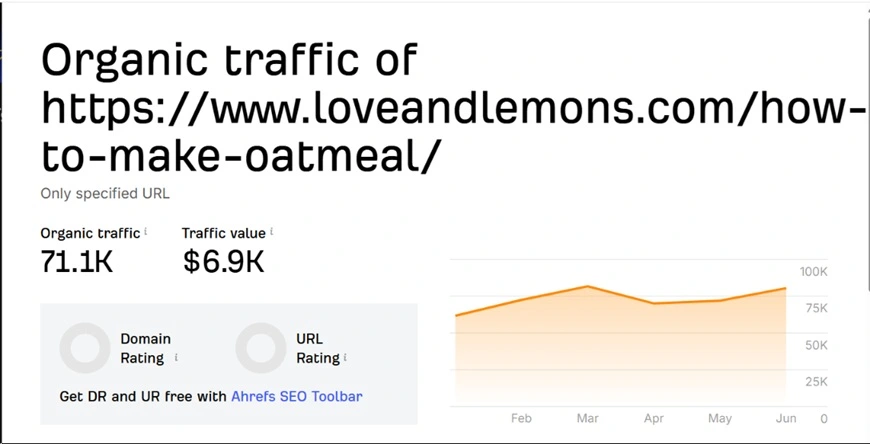
I Googled “oatmeal recipe”. This page from Love and Lemons is ranking on the #1 page.
In the very beginning, she shared two concise sentences.

Then, she shared a relatable story.
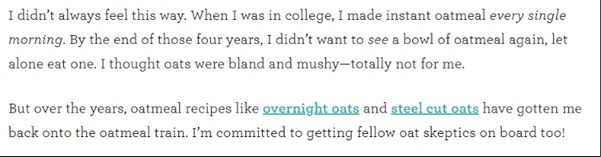
Next, she shared what you can expect from her recipe.

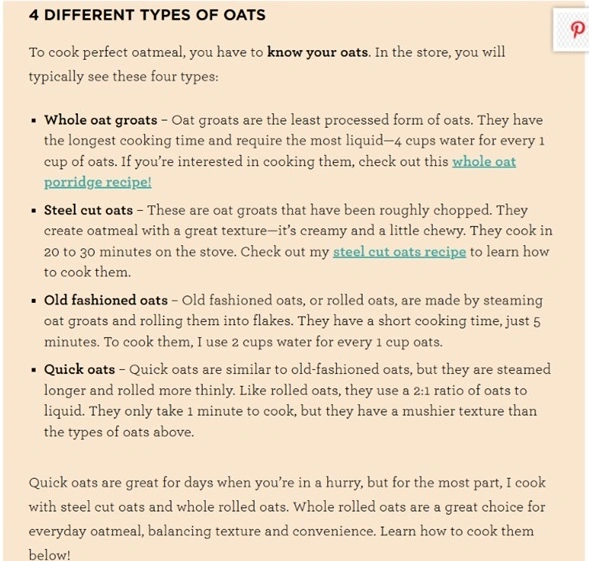
After that, she explained the type of oats. It’s important to know the type of oats before you try any recipe. I know I because I take oats for breakfast daily.
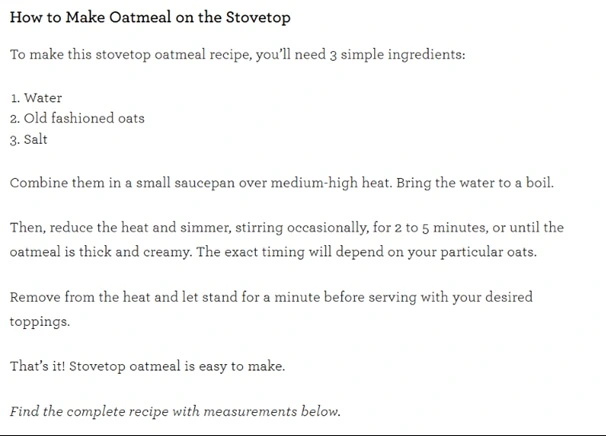
And finally, the recipe.
This simple recipe post is driving 71.1K of visits per month.
Add Images, Screenshots, Videos, and GIFs
MIT neuroscientists found that the human brain can process entire images that the eye sees for as little as 13 milliseconds.
Yes. It’s 13 milliseconds.
You should add images and screenshots to every single blog post. You can also use videos. Using videos can help them help increase your time on site.
Recently, I published a post on WordPress Statistics. You can see how I use custom graphics.
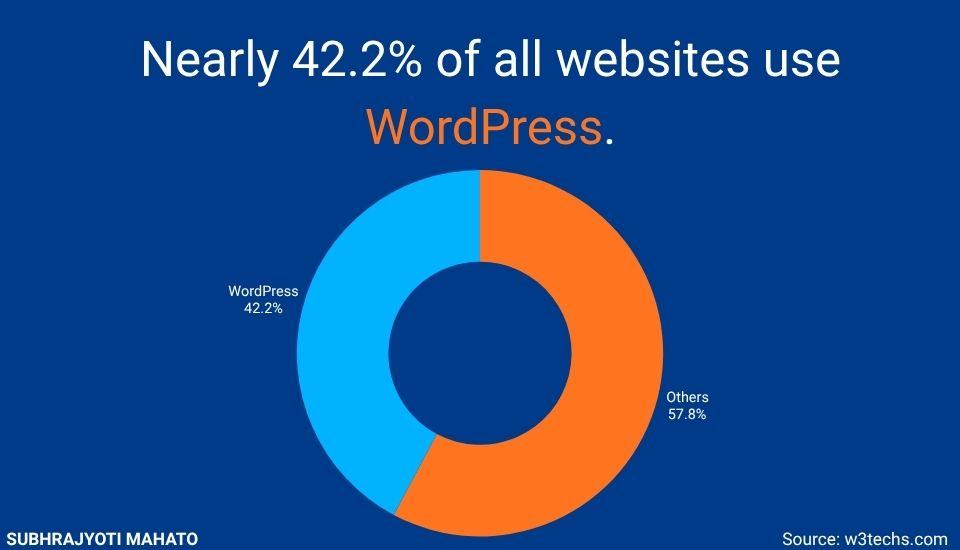
I use Canva to create custom graphics for my blog.
Make Your Content Scannable
Now most people use it on mobile devices. And it’s hard to read the content on a 6-inch device.
It will be harder if your content is not scannable.
That’s why you write content like this:
Some tips to make your content scannable:
- Use short sentences
- Use 3-5 line paragraphs
- Write in active voice
- Cut the fluff in the editing room
- Have enough white space to let your content breathe
Another tip to make your content scannable is:
Use Subheadings to Slice Your Content
Imagine reading a book without chapters.
You can’t imagine, right?
Chapters are helpful to chunk a big topic into small pieces.
It helps the readers digest and understand the information without getting overwhelmed.
You should use subheadings to chunk your content. Make sure you’re using relevant subheadings.
And use keywords in subheadings when it makes sense. Don’t force any keyword.
Factor #2: Search Intent
Search intent is the reason behind a user’s query. It’s one of the most important Google ranking factors.
You need to satisfy the search intent to rank higher on Google.
But before satisfying the search intent, you need to identify the search intent.
Here’s how you can identify search intent and satisfy it.
I’m going to show with an example.
I Googled “CRM software for small businesses”. You can see the result.
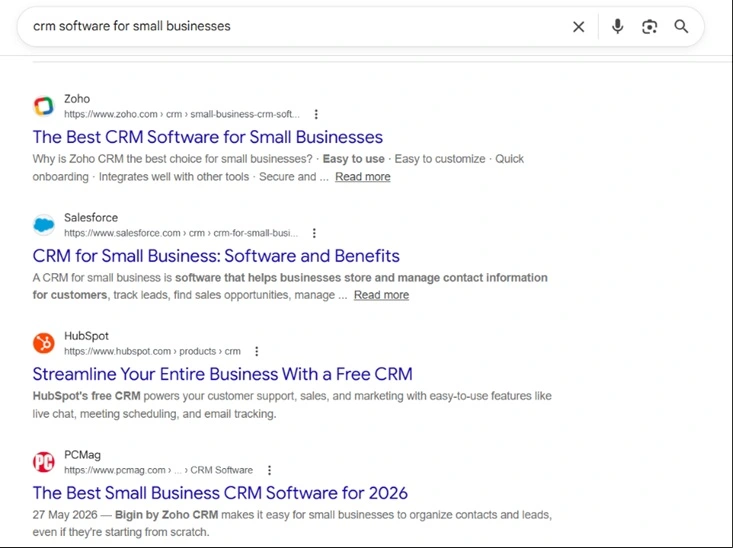
You can see that most of the results are listicles.
If I want to rank for this keyword, I’ll need to write a listicle—like 11 Best CRM Software for Small Businesses.
Because that’s what people are looking for.
Factor #3: Backlinks From Relevant and Authoritative Websites
If you want to rank higher on Google, you need to build links to your website.
Backlink building has changed a lot. Spammy link-building tactics don’t work anymore.
You need to build links from high-quality and relevant websites.
More links are not always better.
Relevance is the KEY here.
I’ll explain with an example:
If you’ve a website with a nutrition blog and you have two links.
One from a nutrition website with a DR (Domain Rating) of 52.
Another is from an entertainment news site with a DR of 85.
You can use my website authority checker tool to check DR of any website.
The backlink from the nutrition website is more valuable than the backlink from the entertainment website.
Remember, you need to build links from relevant websites.
5 Ways to Build High Quality and Relevant Backlinks To Your Website
Link building is hard.
It’s not easy to convince someone to link out to your website.
But that doesn’t mean you can’t build links.
I’m going to share some effective link-building techniques.
Turn Unlinked Brand Mentions Into Backlinks
What is an unlinked brand mention?
When someone mentions your name or your brand name on their website, but doesn’t link out to you.
This method only works if your brand is a little old and people know about your brand name and your name. If your website is new, you can skip this.
Find websites that mention your brand name but haven’t linked to your website.
Here’s how you can find websites that mention your brand name.
Search for “your brand name” – yourwebsite.com
Google will show you websites that mention your brand but haven’t linked to you.
Once you find a website, send them an email like this:
Hi [Name],
I was browsing [their website/article name] and noticed you mentioned [Your Brand] — really appreciate the shoutout!
I just wanted to reach out and say thanks.
One small thing: if you ever get a chance, it’d be awesome if you could add a link to [your URL] alongside the mention.
It helps readers find us easily and gives the reference a bit more context.
Either way, no pressure at all.
Thanks again for the mention. Love what you’re doing over at [their site].
Cheers,
[Your Name]
Not all websites will link out to you. Some websites might link out.
Publish Guest Blog Posts on Relevant Websites
Guest blogging is the practice of publishing blog posts on someone else’s website or blog. You provide a valuable blog post, and they allow a do-follow backlink to your website.
As you’re adding value to their audience, chances are they’re more likely to accept your blog post.
Some sites may ask for payment to publish guest posts.
Some sites may just want a valuable post.
You can find a website using Google string searches:
Search for these strings:
- Keyword “Guest Post”
- Keyword “Submit a Guest Post”.
- Keyword “Contribute an article”
Once you find websites that accept guest posts, you need to send a pitch.
Here’s a guest post sample pitch for you:
Subject: Quick idea for the [Target Blog Name] blog
Hey [Name],
I was just reading your recent post on [Topic of their recent post] and really liked your point about [Specific detail from their post].
I’d love to contribute a guest post to your site. I’m a [Your Background] and have been working deeply on [General area of expertise], which has given me some fresh, actionable insights I think your audience would appreciate.
Here are a couple of concepts I’d love to write about for you:
- Idea 1
- Idea 2
- Idea 3
I’ll make sure the piece is completely fluff-free, highly practical, and perfectly tailored to your editorial style.
You can check my recent published article here: [Enter your published article]
Let me know if either of these hits the mark!
Best,
[Your Name]
Publish Pages Having Statistics and Data
Having a page with statistics and data can help you attract backlinks naturally. Journalists and bloggers often look for data and stats while writing.
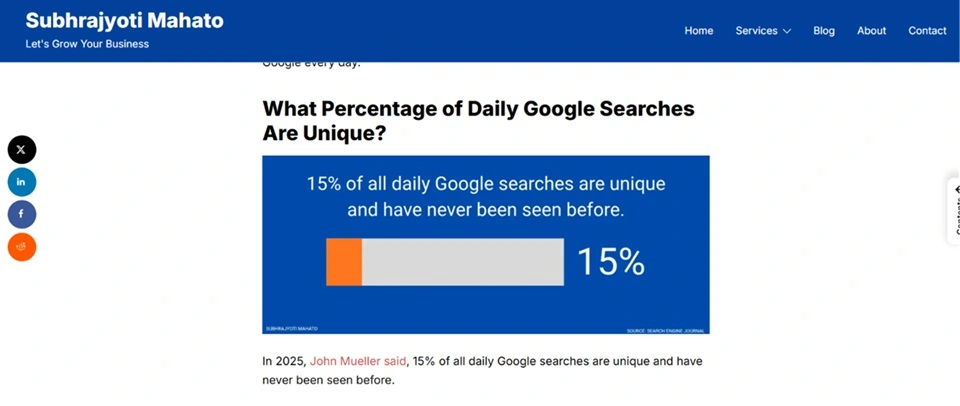
They Google something like how many searches Google handles per day.
When you create a stats page on relevant topics on your page. Journalists will link out to your website as a source.
You just need to create a page with a LOT of relevant statistics.
A few weeks ago, I published a post on SEO statistics.
Broken Link Building
Broken link building is a process of finding web pages that no longer exist and asking them to replace your webpage as a replacement.
Sometimes, web pages get deleted for some reason. These pages will return a 404 error page.
Find pages with broken links. You can use Semrush to check broken links. You can also install a Chrome extension called Check My Links.
This extension will show you dead 404 pages on any website.
Just visit any page and click on the extension. It will show you the 404 pages.
Once you find a broken link that you can replace with your content, you need to send an email pitch.
Here’s an email template.
Hey [Name],
Came across your post on [Topic] today. I really liked your point about [Specific detail].
Just a quick heads-up that the link pointing to [Anchor text/Dead URL] seems to be broken (404 error).
If you want to swap it out so readers don’t hit a dead end, I actually published a guide on that exact topic that might make a good replacement: [Link to your article].
Either way, hope it helps keep the post fresh!
Best,
[Your Name]
Digital PR
Digital PR is an effective link-building technique. But it takes a lot of work and time to conduct a digital PR campaign.
It will be worth the effort.
Because a single digital PR campaign can help you get dozens of backlinks from high-quality and relevant websites.
First of all, you need to create link-worthy content for your website that journalists want to cite.
Link-worthy content can be a survey or original research.
Once your asset is ready, you find and pitch journalists.
Here’s a digital PR pitch template.
Hey [Name],
I’ve been following your coverage of [Journalist’s Beat/Industry] at [Publication Name], especially your recent piece on [Topic of their recent article].
We just wrapped up some research/an analysis on [Core Topic] and uncovered a pretty surprising trend that feels right up your alley:
- Key Insight
- Key Insight
- Key Insight
I have the full data breakdown, graphics, and some methodology notes ready to go if you think your readers would find this interesting for an upcoming piece
I can also hook you up with an exclusive angle or expert commentary if you’d like.
Let me know if you want me to send the details over!
Best,
[Your Name]
Factor #4: User Experience
How your users are interacting with your website.
If your readers are not happy with the website user experience, they might leave your website.
And you don’t want that.
Right?
When so many users bounce back from your website, it sends Google a signal that the website is not providing value.
Google might downrank your website.
So, you need to provide the BEST experience possible.
Here are some UX optimization tips.
Make Your Navigation Menu User-Friendly
Some sites have terrible navigation menus. It makes both users and Google find it hard to use a website.
You need to avoid that.
You should make your website’s navigation menu easy to navigate.
Have a Logical Site Structure
Define your categories and subcategories.
It helps users understand the site hierarchy and find content on your website.
Plus, it helps search engines understand the relevance of your content.
Crawl Depth
What’s crawl depth?
I hear you ask.
How many times does a user need to click to reach a page?
If a web page has a crawl depth of 3, this means users need to click 3 times to reach a page.
You can check crawl depth using a tool like Screaming Frog or Semrush.
Ideally, your web pages should have a crawl depth of 4 or less.
Factor #5: Technical SEO
Technical SEO is the practice of optimising your website’s technical aspects of SEO. It includes crawling, indexing, core web vitals, website load-time, and many more.
In this post, I’m going to only share what matters the most.
Because it’s super hard to fix all the technical SEO issues.
And you don’t need to.
Yes, fixing the critical technical SEO can help you rank higher.
How To Find and Fix Technical SEO Issues
Conduct a Technical Audit
I use Screaming Frog to conduct a technical audit. It’s a freemium software.
You can download and use it for free.
You can also use any other tool, like Sitebulb or Semrush.
I use Screaming Frog.
Here’s how you can audit your website using Screaming Frog: How to do an SEO Audit With Screaming Frog (#1 Way to Fix Issues Fast)
It will take some time, depending on your website’s size.
Once you’ve found the technical issues, fix them.
Make Sure Google Can Crawl Your Website
To index your website, you need to make sure Google crawls your website.
It takes time for Google to crawl your website. In that case, don’t panic. Give it some time.
Check the robots.txt file. You can check if your robots.txt file is blocking your important pages.
Create a Sitemap and Submit It to Google Search Console
A sitemap is a file that contains all URLs of your posts, files, and images. It tells Google which pages are important.
If you’re using WordPress, you can create a sitemap using the Yoast SEO plugin.
Once you’ve created a sitemap, submit it to Google Search Console.
PageSpeed
PageSpeed is a confirmed ranking factor. In 2010, they announced that pagespeed is a ranking factor for desktop searches.
And after 8 years, they announced it would be a ranking factor for mobile searches too.
When you visit a page, and it takes too much time to load, what do you do?
Bounce back, right?
Most people are like that. They don’t like slow websites.
Speeding up your website can help you improve your organic visibility on Google.
Some speed optimization tips:
- Use a high-quality web hosting like WPX or Bluehost
- Compress images using TinyPNG or any other tool
- Reduce your web page size
- Use a faster theme like Astra
- If you’re using WordPress, use a Caching plugin like WP Rocket.
- Use a good quality CDN like Cloudflare
Factor #6: Keyword Optimization
Keyword optimization is the most misunderstood topic in SEO. People read about keyword optimization and fill the page with keywords.
It’s 2026. And still people do that.
You need to avoid keyword stuffing.
Google’s algorithms are smart, and they can understand a topic without you mentioning a keyword a hundred times.
You don’t need to mention your keywords hundreds of times.
You just need to add keywords in:
- The first 100 words
- Title tag
- URL
- A few times throughout the post naturally
- Subheadings (when it makes sense)
Factor #7: Schema
Schema is not a direct ranking factor. But it helps Google understand the type of content.
Some say it improved their ranking. On the other hand, some say there’s no benefit.
In 2020, Google Search Liaison clarified, “structured data like this has no impact on ranking in web search.”
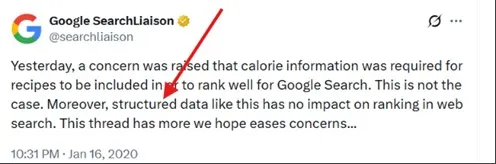
Here’s what Google wrote on their Search Central:

I recommend using schema when it is relevant to the type of content.
Using schema can help Google to understand the relevance of a page and improve your organic visibility because of rich snippets.
Plus, AI systems like Gemini, Claude, ChatGPT, Perplexity, and Grok rely on structured data to understand content.
Here are the types of schema:
- Local Business
- Product Snippet
- Recipe
- Review Snippet
- Breadcrumb
- Organization
- Product Person
Factor #8: Brand Signal
Google trusts you when you’ve a strong brand.
Eric Schmidt (Then CEO of Google) said, “Brands are the solution, not the problem.”
When people search your brand name on Google, it’s a strong ranking signal.
When you get mentioned on Google.
Yes, an unlinked brand mention can help. In a recent Podcast interview, Rand Fishkin (Godfather of SEO) said mentions are more important now.
When people talk about your brand, you’ll be perceived as a strong brand.
Google tends to rank strong brands higher.
That’s the reason Google often ranks well-known brands over new brands.
So invest in building a strong brand.
Read Also: WordPress SEO Guide to Rank Your WordPress Website Higher on Google
Conclusion
These are the top Google ranking factors in 2026.
If you want to rank higher on Google, you need to focus on these important ranking factors.
SEO takes time. You need to keep working.
Create content. Build links. And fix critical technical issues.
If you’ve any questions, comment below. I’ll try my best to answer.